How to write an AI policy for your business

Somebody in your business has probably pasted something into a chatbot this week. They may have used it to draft a customer email, summarise a long document, or make sense of a spreadsheet. They will have decided for themselves whether that was acceptable, how far to trust what came back, and whether to mention it to anyone.
Those decisions get made whether or not you have written anything down. A policy determines whether they are made consistently, and whether you know they have been made at all.
Employees in 76% of UK organisations are now using AI tools at work, and 62% among SMEs [1]. While 61% of employers permit staff to use generative AI, only 31% have worked on a formal policy for it in the past year [2]. That number has doubled in two years, so employers are catching up, but a substantial number are still permitting a technology they have set no rules around.
This article sets out what belongs in an AI policy, how to write one your staff will actually follow, and how to introduce it.
Summary
- Employees in 76% of UK organisations use AI tools at work, and 62% of SMEs, but only 31% of employers worked on a formal AI policy in the past year [12].
- Restricting AI use does not reliably reduce it. Microsoft research found 71% of UK employees have used unapproved consumer AI tools at work, and 51% do so weekly [3].
- The reasons employees give are practical rather than rebellious: 41% say consumer tools are what they use at home, and 28% say their employer offers no approved alternative [3].
- The absence of a policy tends to penalise the most cautious staff, who avoid AI entirely while less cautious colleagues proceed without guidance.
- A workable policy answers four questions: which tools may be used, what must never be entered into them, who checks the output, and what to do when something goes wrong.
- Naming the specific tool and account type matters, because free and paid tiers differ in whether the information entered is used to train the model.
- The list of information that must never be entered is the most important section, and it works only if it is specific enough to be recalled under time pressure.
- The level of checking should be proportionate to consequence. Fabricated figures, quotes and citations appear in the same confident register as accurate ones.
- Time savings depend heavily on the task. A DWP trial found average savings of 19 minutes a day, but on some tasks verification cancelled the benefit out [4].
- Training is where most employers fall short. Despite sessions being available, most staff in the DWP trial taught themselves by trial and error [4].
- A policy is only as good as its distribution: it needs acknowledgement records, a place in induction, and a six-month review cycle.
Why the gap between use and policy matters
Restriction does not remove the behaviour
A quarter (25%) of UK organisations do not allow employees to use generative AI and have no plans to [2]. The evidence suggests this is less effective than it appears.
Microsoft research conducted by Censuswide among 2,003 UK employees in October 2025 found that 71% had used unapproved consumer AI tools at work, and 51% continued to do so every week [3]. The reasons employees gave were practical. Four in ten (41%) said consumer tools are what they are used to in their personal life. More than a quarter (28%) said their employer provided no work-approved option [3].
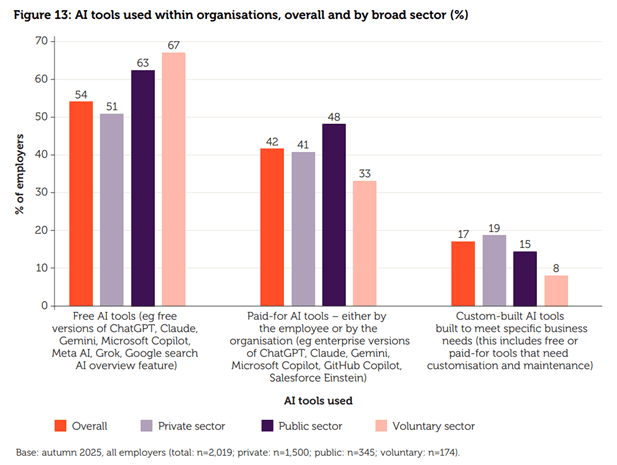 Reported use of free versus paid-for AI tools by UK employers. Source: CIPD, Labour Market Outlook Autumn 2025. [1]
The absence of a policy affects cautious staff most
Where no policy exists, employees tend to divide into two groups. Some treat the absence of a rule as permission and use AI freely, while others treat it as a risk and avoid AI altogether. The dividing line is disposition rather than seniority or competence.
The employees who abstain work more slowly as a result, while colleagues who are more comfortable making their own judgement calls are the ones deciding what customer information is safe to enter into a chatbot. The business gets neither the productivity benefit from the first group nor any oversight of the second.
The time saved depends on the task
AI output has to be checked, and checking takes time. Where that time exceeds the time saved, the tool has cost the business rather than helped it.
The DWP published an evaluation of its Copilot trial in January 2026 [4]. 3,549 staff took part, and outcomes were compared against a group of 2,535 non-users rather than relying on users' impressions alone. The findings relate to office-based staff using a paid licence, so a smaller business on free tools should read them as indicative rather than directly transferable.
Copilot users saved an estimated average of 19 minutes per day across eight routine tasks.
The savings were not evenly distributed. They were largest for searching for existing information (26 minutes) and writing emails (25 minutes), and smallest for transcribing or summarising meetings (9 minutes) [4]. Users also reported that Copilot performed poorly on data-heavy work in Excel.
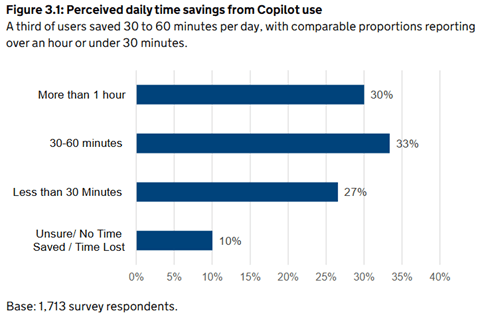 Estimated daily time saved by task. Source: DWP, An Evaluation of DWP's Microsoft 365 Copilot Trial, 2026. [4]
The evaluation records the other side of this directly. Some users found that verifying the output removed the benefit, with one participant reporting that having checked the result, they concluded the task would have been quicker done manually from the start [4]. The report also found that output accuracy depended heavily on how the request was phrased, and that vague prompts produced fabricated or irrelevant results.
These findings are the reason guidance is worth writing. Employees given no direction on which tasks AI handles well will establish that individually, and some will spend longer checking a poor output than the task would have taken to do directly. Setting out which tasks the tool suits, which it does not, and what must always be checked against a source allows the organisation to apply what it has learned rather than requiring each employee to learn it separately.
What an AI policy is for
An AI policy is a set of decisions made centrally so that employees do not have to make them individually. It should answer four questions:
- Which tools may I use?
- What information must never be entered into them?
- Who checks the output before it leaves the business?
- What do I do if something goes wrong?
If the document answers those questions in plain English, it is doing its job. A policy that needs a contents page is unlikely to be read, and an unread policy provides no protection.
The sections a policy needs
1. Purpose and scope
One paragraph covering who the policy applies to - including contractors and temporary staff - and why it exists.
Decide at this point whether the AI policy sits as a standalone document or as a section within your employee handbook. A standalone document is easier to update on a six-month cycle, which matters more here than for most policies. It should be cross-referenced from the handbook and from your IT and data protection policies for ease of access.
2. Approved tools
Name the tools. "Employees may use approved AI tools" is not a usable rule, because nobody knows which tools have been approved. "Employees may use Microsoft Copilot on their company account. Personal accounts must not be used for work tasks" can be followed or breached, and both the employee and the employer can tell which.
Specify the account type as well as the product. The distinction between a free consumer account and a paid business account usually determines whether the information entered is used to train the underlying model. Free tiers commonly do this; business and enterprise tiers commonly allow it to be switched off. Check the current terms with each provider rather than assuming, and check again at each review, because they change.
This is a common situation rather than an edge case. The CIPD's Labour Market Outlook, a survey of more than 2,000 UK employers, found that 54% said their employees use free versions of AI tools, compared with 42% using paid-for versions [1].
Include a process for adding tools to the approved list. Employees will find tools that are useful and not yet approved. If the only options are to use them without telling anyone or not to use them, the policy will be worked around rather than followed. A named contact and a short request process brings these tools into view.
3. Information that must never be entered
This is the most important section, and it should be specific.
General wording does not work here, because it returns the judgement to the employee. "Employees must not enter confidential or sensitive data into AI tools" requires each member of staff to decide what counts as sensitive, and their definitions will vary. Compare:
General: "Employees must not enter confidential or sensitive data into AI tools."
Specific: "Never enter any of the following into any AI tool: customer names, addresses or account numbers; employee records, including pay, performance or absence; anything covered by an NDA; passwords or logins; unpublished financial results; supplier pricing."
4. Human review and accountability
A named person is accountable for every output, regardless of how it was produced. AI use does not transfer responsibility away from the employee or the business.
Review should be proportionate to consequence. Applying the same level of scrutiny to an internal draft and a customer-facing financial summary wastes time on the first and provides insufficient protection on the second.
Example:
| Output type | Review needed |
|---|---|
| Internal drafts, brainstorming, summarising your own notes | Author's judgement |
| Internal documents others will rely on | Author checks facts and figures against source |
| Anything customer-facing | Named second person checks before it goes out |
| Any figures, quotes, statistics or citations | Verified against the original source, always |
The final row is the one that causes the most problems in practice. Generative AI tools produce fabricated figures, quotations and references in the same confident register as accurate ones, and there is no reliable way to identify them from the output alone. The DWP evaluation found that users were most cautious precisely where the tool drew on external sources or unfamiliar material, and that poorly framed requests produced fabricated results [4]. One participant summarised the position: the output is useful for starting research, but cannot be treated as a source in itself.
Any number, quotation or source that appears in AI output should be checked against the original before it is used.
5. Disclosure
Decide when AI use should be declared, and to whom.
Some businesses require disclosure on any customer deliverable. Others require it only where AI made a substantive contribution, rather than assisting with drafting or formatting. Some customers and sectors will have their own expectations that override yours, and public sector or regulated clients increasingly ask the question directly at tender stage.
There is no single correct answer, and the right one depends on what you do and who you do it for. What causes problems is leaving the question open. Where the policy is silent, each employee answers it for themselves, which means your business gives different answers to different customers, and you may discover your own position for the first time when a customer asks.
Apply whatever you decide to the leadership team as well. A disclosure rule that exempts senior staff will not hold, because the people it exempts are the ones producing the most customer-facing material.
6. AI in people decisions
If AI is used in recruitment, promotion, performance management or disciplinary processes, that use should be deliberate, documented, and subject to a human decision rather than human confirmation of an AI recommendation. State which of these processes AI may be used in, in what capacity, and who holds the decision.
The most common unplanned use is a manager entering a candidate shortlist into a chatbot and asking it to rank them. If the policy does not address this, it will happen without the employer's knowledge.
7. What to do when something goes wrong
Employees need a route for reporting mistakes.
If someone enters customer data into a consumer chatbot, the employer needs to know quickly. That will only happen if the reporting route is clear and the response is proportionate. If employees expect disciplinary action, they are unlikely to report the error, and the business is more likely to find out from the customer.
8. Ownership and review
Name the policy owner and the review date. Six months is a reasonable interval, as both the tools and their pricing tiers change frequently. Include a version number and date on the document.
Writing the policy
Establish current use first
Ask each team which AI tools they currently use and what they use them for. Phrase this as a question rather than an audit, or the answers will be incomplete.
This has two benefits. The policy will reflect how people actually work, which makes it more likely to be followed. It also corrects for the fact that senior teams often have an inaccurate picture of AI use in their organisation.
Write for someone working under time pressure
The policy will usually be recalled from memory by someone with a deadline, not consulted at leisure. Use short sentences, specific examples, and concrete terms rather than general principles.
Record who has read it
A policy only helps you if you can show that the current version reached the people it covers. Record acknowledgements, and build it into your onboarding process so that new starters read it alongside your other day-one documentation. When the policy is updated, reissue it rather than relying on staff to notice the change.
Introducing the policy
A policy sets out the rules. It does not explain what AI is reliable for, where it fails, or how to identify a fabricated statistic. Without that, review requirements become a formality.
CIPD analysis of generative AI adoption found that 35% of employers had provided training and support to help employees use generative AI in the past 12 months [2], meaning the majority had not, including many who permit its use.
The DWP evaluation is useful on what training should look like. Despite formal sessions being available, 89% of participants learned to use the tool through self-directed exploration, and most did not recall attending any training [4]. What they asked for was training tailored to their own role and job function, practical examples of what worked, short sessions covering one feature at a time, and a reference sheet of prompts they could keep to hand [4].
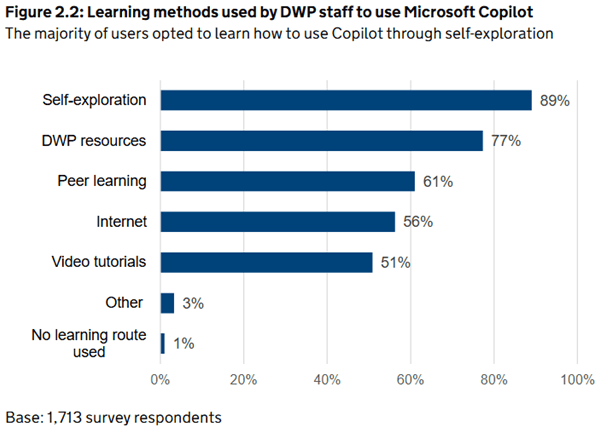 How staff actually learned to use the tool, despite training being available. Source: DWP, An Evaluation of DWP's Microsoft 365 Copilot Trial, 2026. [4]
A short session in which each team works through examples from their own workload is more effective than general theory, and it surfaces situations the policy has not covered. Treat it as part of your wider approach to employee development rather than as a one-off exercise attached to the policy launch.
Address the effect on jobs
Employees are likely to be concerned about whether AI will affect their roles. If the employer does not address this, staff will draw their own conclusions, and that will shape how they respond to the policy.
The position for smaller businesses is genuinely different from the one reported in the headlines, and it is worth setting out. The CIPD found that 49% of employers expect AI to make no difference to their headcount over the next 12 months, and 17% expect it to reduce headcount. Among SMEs, however, only 7% expect a reduction, compared with 26% of large private sector employers [1]. The CIPD's own reading of this is that SMEs appear to be doing more with the same number of people, while large private sector employers appear to be streamlining [1].
If you are an SME, that is a fair thing to tell your staff: the intention is to remove work that nobody enjoys, not to remove people. Where that is your position, say so plainly, and be equally plain about what you cannot promise. Where AI does change what roles look like over time, that belongs in your workforce planning rather than being handled through an AI policy.
Getting the balance right
Employers responding to AI tend to focus on constraining their use. On its own, restriction tends to move the activity out of view rather than stop it, which leaves the business without either the productivity benefit or the oversight.
The policies that work are short enough to be remembered, specific enough to be followed, based on how employees actually work, and supported by training that allows staff to exercise the judgement the policy asks of them. Employees are already making decisions about AI use. The policy determines the basis on which they make them.
This article is intended for general informational purposes only and does not constitute legal, compliance or professional advice. While it highlights some key considerations for organisations developing an AI policy, Mentor does not provide AI policy creation services or advice tailored to individual organisations. We recommend seeking appropriate independent advice to ensure any AI policy is suitable for your organisation’s needs.
[1] CIPD, Labour Market Outlook: Autumn 2025, November 2025.
[2] CIPD, Generative AI at work: can it deliver the productivity boost UK employers need?, January 2026.
[3] Microsoft UK, Rise in 'Shadow AI' tools raising security concerns for UK organisations, October 2025.
[4] Department for Work and Pensions, An Evaluation of DWP's Microsoft 365 Copilot Trial, January 2026.
Registered Office: Pioneer House, Pioneer Business Park, North Road, Ellesmere Port, CH65 1AD.
Registered in England and Wales No. 16896022.